
Since version 24.2.0, the connector ships a new set of jobs that use custom job steps. This article explains how to move from the old jobs to the new ones, and describes the old jobs for the instances that still use them.
If your job panel lists jobs named 1-Akeneo-Import-Attributes, 2-1-1-Akeneo-DIFFERENTIAL-Import-Assets, 3-2-1-Akeneo-FULL-Import-Master and so on, you are using the old jobs. The new ones are named 1.0 - Akeneo-Full-Import, 2.0 - Akeneo-Scheduled-Differential-Import, and 3.1 to 3.5. See Synchronization: load and transfer data for the new jobs.
Migrating to the new jobs
The new jobs are designed to be backwards compatible, so your existing jobs will continue to function as before. We nevertheless advise adopting the new jobs: they match the functionality of the old ones, follow the latest SFCC-recommended job practices, and because some new jobs combine the features of several old ones, they reduce the likelihood of human error.
To transition, keep the new jobs once they are all imported and remove the old ones. You can maintain both sets concurrently, but we recommend using the new jobs exclusively and removing the old ones to decrease the chance of errors.
Differences between new jobs and old jobs
- Related jobs and steps are now grouped together for efficiency.
- Job parameters are used to determine specific functions.
- The import type in new jobs is defined by job parameters, removing the need for separate differential and full import jobs.
- The new, streamlined job structure enhances user experience.
- The 1.0 - Akeneo-Full-Import job can be used to manually import everything without running multiple jobs.
- The 2.0 - Akeneo-Scheduled-Differential-Import job can be set up to run at regular intervals, ensuring continuous updates from Akeneo PIM to your instance.
Replacement jobs
| Old job or jobs | Replaced by |
|---|---|
| 1-Akeneo-Import-Attributes | Akeneo-Attribute-Import |
| 2-1-1-Akeneo-DIFFERENTIAL-Import-Assets, 2-2-1-Akeneo-FULL-Import-Media-Assets | Akeneo-Media-Assets-Import |
| 2-1-2-Akeneo-DIFFERENTIAL-Import-Pricebook, 2-2-2-Akeneo-FULL-Import-Pricebook | Akeneo-Pricebook-Import |
| 3-0-Akeneo-FULL-Import-Initialization, 3-1-1-Akeneo-DIFFERENTIAL-Import-Master, 3-1-2-Akeneo-DIFFERENTIAL-Import-Storefront, 3-2-1-Akeneo-FULL-Import-Master, 3-2-2-Akeneo-FULL-Import-Master-Variation, 3-2-3-Akeneo-FULL-Import-Master-Images, 3-2-4-Akeneo-FULL-Import-Storefront, TECH-Akeneo-Save-Catalog-Refinements | Akeneo-Catalog-Import |
| 4-Akeneo-DIFFERENTIAL-Entity-Import, 4-Akeneo-FULL-Entity-Import, 5-Akeneo-Entity-Record-Grouping | Akeneo-Entity-Import |
Keeping the old jobs
If you wish to continue using the existing jobs, you may do so without any alterations. The descriptions of each old job are given below.
Using the old job panel
If you still use the old job panel, please find the description of each job below.
1-Akeneo-Import-Attributes job
This job is designed to import product attributes from Akeneo. It creates an XML file that is then packed into a ZIP file for importing. Since there isn't a built-in tool for importing attributes directly, this job is a custom solution.
This job imports:
- PIM attributes
- PIM attribute options (from simple and multi-select attribute types)
Depending on your connector configuration, some attributes can be mapped with default SFCC product attributes.
2-1-1-Akeneo-DIFFERENTIAL-Import-Assets job
This job imports the changes in assets. This will copy the PIM data into the cartridge. However, to see the changes applied to the products, you must run the 3-1-1-Akeneo-Differential-Import-Master. As differential imports are the most common jobs to be running, these are displayed before the FULL.
2-1-2-Akeneo-DIFFERENTIAL-Import-Pricebook job
This job imports the changes in the Pricebook. However, to see the changes applied to the products, you must run the 3-1-1-Akeneo-Differential-Import-Master job.
2-2-1-Akeneo-FULL-Import-Media-Assets job
This job is responsible for transferring image and asset data from Akeneo PIM to the SFCC server, without considering differences in the last modified timestamps.
Imports:
- PIM images from image attribute type (depending on your connector configuration)
- PIM images from asset attribute type (depending on your connector configuration)
2-2-2-Akeneo-FULL-Import-Pricebook job
This job is responsible for transferring pricebook data from Akeneo PIM to the SFCC server, disregarding any variations in the 'last modified' timestamps.
Imports:
- PIM currencies (to create a Pricebook in SFCC)
For versions under 22.2.1, there is only one job named 2-2 Akeneo-Import-Media-Assets-Pricebook. This job has been split into two jobs (2-2-1-Akeneo-FULL-Import-Media-Assets job and 2-2-2-Akeneo-FULL-Import-Pricebook job) to improve performance.
3-0-Akeneo-FULL-Import-Initialization job
This job runs the following jobs in the given order:
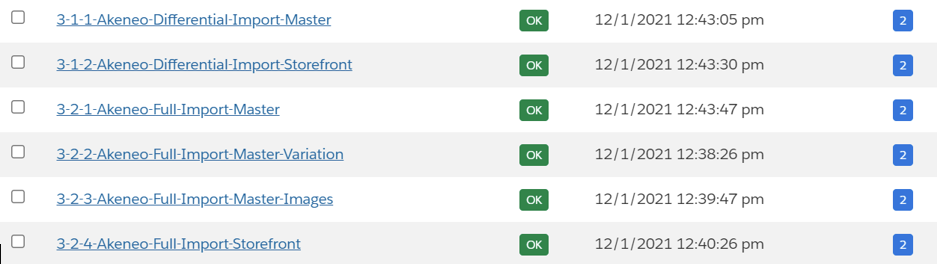
- 3-2-1-Akeneo-FULL-Import-Master
- 3-2-2-Akeneo-FULL-Import-Master-Variation
- 3-2-3-Akeneo-FULL-Import-Master-Images
- 3-2-4-Akeneo-FULL-Import-Storefront
3-1-1-Akeneo-DIFFERENTIAL-Import-Master & 3-1-2-Akeneo-DIFFERENTIAL-Import-Storefront jobs
Import only new products since the last "successful" import.
These jobs import:
- PIM categories
- PIM products and product models
- PIM product associations
- Relation between products and images
3-2-1-Akeneo-FULL-Import-Master & 3-2-2-Akeneo-FULL-Import-Master-Variation & 3-2-3-Akeneo-FULL-Import-Master-Images & 3-2-4-Akeneo-FULL-Import-Storefront jobs
Import all products from Akeneo PIM.
These jobs import:
- PIM categories
- PIM products and product models
- PIM product associations
- Relation between products and images
Depending on your connector configuration, you can create some filters to run partial imports on products that match your defined criteria.
4-Akeneo-DIFFERENTIAL-Entity-Import job
This job imports only new Reference Entity Records since the last "successful" import made.
4-Akeneo-FULL-Entity-Import job
This job imports all Reference Entity Records
5-Akeneo-Entity-Record-Grouping job
This job automatically adds some of the entity records to an attribute group, as per the custom site preference values.
Depending on your connector configuration, you can manage how your reference entities will be mapped into SFCC.
These three jobs (4-Akeneo-DIFFERENTIAL-Entity-Import job, 4-Akeneo-FULL-Entity-Import job, and 5-Akeneo-Entity-Record-Grouping job) are not applicable for the Growth Edition or the Community Edition.
TECH-Akeneo-Save-Catalog-Refinements job
Saves the manually contributed catalog refinements to custom cache so that they are not overwritten every time the catalog is reimported in merge mode. This job needs to be run every time some change is made in the catalog refinements.
Managing an empty attribute value after the initial import
For the Connector to take into account the attribute values that have been deleted after the initial import, please select the REPLACE Import mode before triggering your job. This mode will allow the connector to acknowledge the empty values.
REPLACE mode means that an object is recreated with the data provided in the feed. The object doesn't have to exist. Existing attributes that are not provided in the feed are removed during the import. Technically, REPLACE mode equals a DELETE followed by a MERGE.
This import mode is available for all 3-X-X jobs.
In order to change the import mode, please go to: Administration > Job > Select one of the 3-X-X jobs > Select job-workflow-step-import-catalog > Under ImportMode select REPLACE
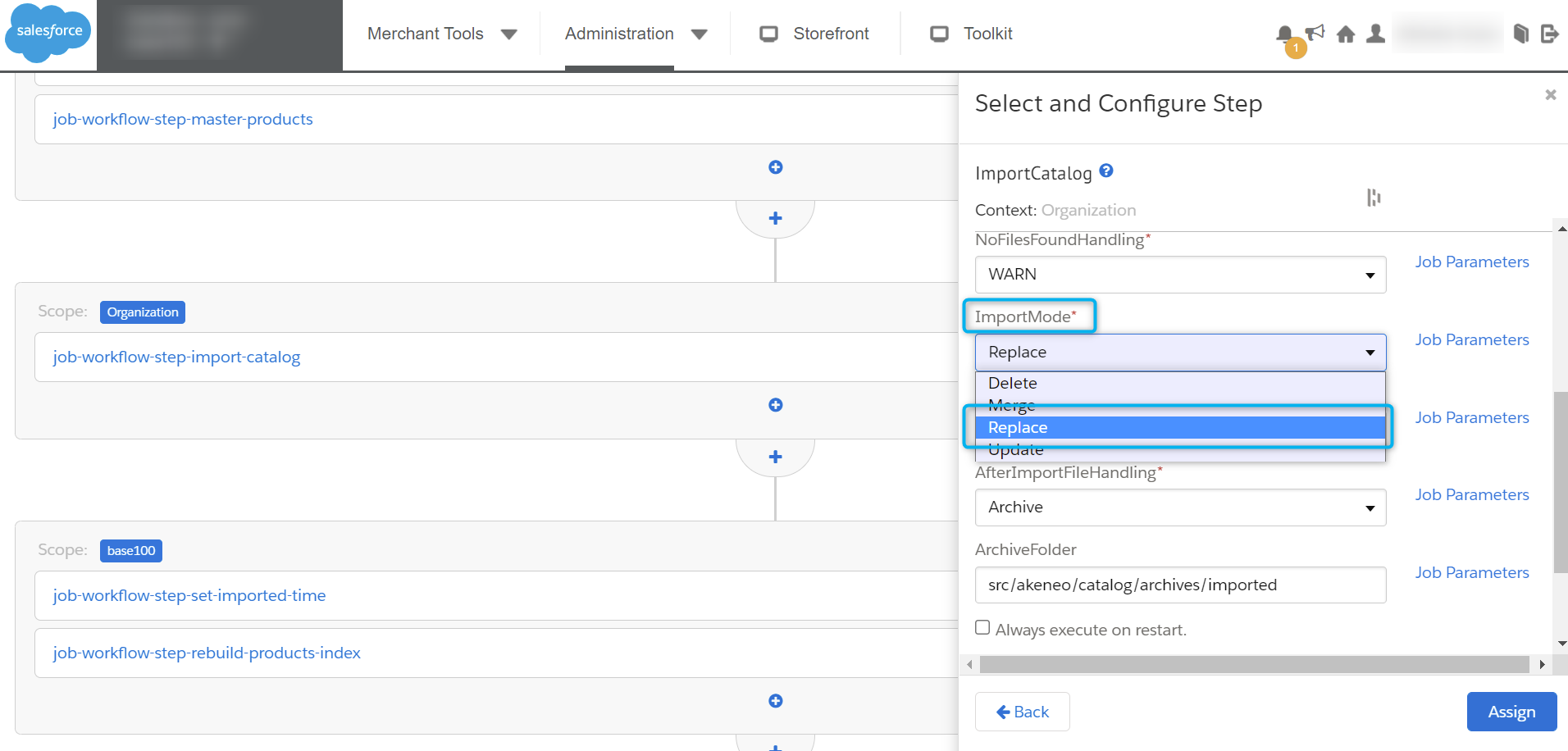
The REPLACE mode will influence the performance and, therefore, the processing time because two actions are performed when the job is triggered. To optimize the performance of your imports, please use the default MERGE value on a daily basis.
On the new jobs, this is handled by the Sync Empty Product Value option instead. See Synchronization: load and transfer data.